
Learn, build, and play
Learn with Lumi, earn XP, and use it to build a city. Choose a civilization, care for its people, and reveal its monuments. Worlds is an optional game alongside your learning.
Alongside your learning
Your learning account has one XP balance. Earn rewards while studying maths, English, coding, or another subject, then return to Worlds to spend that XP on a building. Each civilization keeps its own city, but they all use the same balance.
You can keep learning and earning XP without playing Worlds. Playing also does not require joining a leaderboard. For the exact reward amounts and an example, read How to get XP.
Start playing
- Use the learner's account. Sign in to the same account used for lessons so Worlds can use its XP and completed lessons. A child should use their own account.
- Open Worlds. The welcome screen shows monument artwork. You can use Skip intro, then Play. Returning players see Continue.
- Try How to play. The short picture guide explains the controls. Use Next at your own pace, switch Voice on/off, or pause and replay the narration. You can skip it and reopen it later.
- Choose your world. Preview a civilization, then confirm your choice to start its first chapter. Looking at a world or a plot does not spend XP.
What can I play now?
| Civilization | Available now |
|---|---|
| Chola | Chapters 1–4. Complete each chapter to open the next. |
| Mali | Chapters 1–4. Complete each chapter to open the next. |
| Rome | Chapters 1–4. Complete each chapter to open the next. |
| Travancore | Chapters 1–4. Complete each chapter to open the next. |
| Maurya / Gupta India | Chapters 1–4. Complete each chapter to open the next. |
| Song China | Chapters 1–4. Complete each chapter to open the next. |
| Middle Kingdom Egypt | Chapters 1–4. Complete each chapter to open the next. |
| Norse | Chapters 1–4. Complete each chapter to open the next. |
| Abbasid Baghdad | Chapters 1–4. Complete each chapter to open the next. |
| Inca · Tawantinsuyu | Chapters 1–4. Complete each chapter to open the next. |
| Benin Kingdom | Chapters 1–4. Complete each chapter to open the next. |
| Khmer · Angkor | Chapters 1–4. Complete each chapter to open the next. |
| Edo Japan | Chapters 1–4. Complete each chapter to open the next. |
| Ottoman Istanbul | Chapters 1–4. Complete each chapter to open the next. |
| Mughal India | Chapters 1–4. Complete each chapter to open the next. |
| Dutch Republic | Chapters 1–4. Complete each chapter to open the next. |
| England | Chapters 1–4. Complete each chapter to open the next. |
| Scotland | Chapters 1–4. Complete each chapter to open the next. |
| France | Chapters 1–4. Complete each chapter to open the next. |
| Bohemia | Chapters 1–4. Complete each chapter to open the next. |
| Classical Greece | Chapters 1–4. Complete each chapter to open the next. |
| Byzantium | Chapters 1–4. Complete each chapter to open the next. |
| Venice | Chapters 1–4. Complete each chapter to open the next. |
| Al-Andalus | Chapters 1–4. Complete each chapter to open the next. |
| Mongols · Karakorum | Chapters 1–4. Complete each chapter to open the next. |
| Safavid Persia | Chapters 1–4. Complete each chapter to open the next. |
| Florence | Chapters 1–4. Complete each chapter to open the next. |
| Hanseatic cities | Chapters 1–4. Complete each chapter to open the next. |
| Victorian Manchester | Chapters 1–4. Complete each chapter to open the next. |
| Meiji Japan | Chapters 1–4. Complete each chapter to open the next. |
| Bombay in the 1920s | Chapters 1–4. Complete each chapter to open the next. |
| Gilded Age New York | Chapters 1–4. Complete each chapter to open the next. |
Unlock Wave 4: finish all four chapters of one Wave 3 civilization: Abbasid, Inca, Benin or Khmer. Completing chapters in different civilizations does not combine toward this milestone.
Use the Your world, Catalog and Atlas tabs at the top of Worlds. Catalog shows the civilization cards; Atlas lets you explore the illustrated worlds and their chapters. Browsing never spends XP or changes your active civilization.
Unlock Atlas 2: finish all four chapters of one Wave 4 civilization to enter its sixteen civilizations and 64 chapters. You can preview them before unlocking. Atlas 3 is an artwork concept preview; its civilizations are not playable yet.
Use Choose a world to switch civilizations. Your buildings stay saved. Finishing the last currently available chapter lets you revisit that city or explore another civilization.
Monuments to work toward
These are illustrations from the game, not photographs. Each landmark has its own Building story to explore. Some are in the opening chapter; others are goals for later chapters.


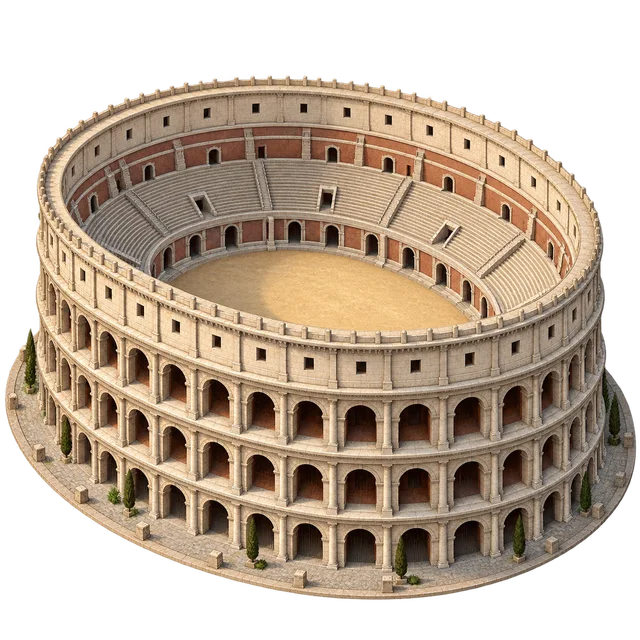


Select a landmark plot to see its XP cost, completed-lesson requirement, and neighborhood buildings. Meet all three requirements, then choose Reveal to add it to your city.
Your four main controls
01
Build
Choose a plot, read what it needs, and buy a building with XP.
02
Run a day
Open the planner, assign crews, and check food, water, and other supplies.
03
Learn for XP
Return to your learning dashboard to work toward your next building.
04
Choose a world
Explore another civilization. Your existing cities stay saved.
On the map, select a + plot or a project in the building list. Read its requirements before selecting Build. Use Make this my next project to save a goal without buying it. You can zoom into the map and use Pause motion if you prefer a still view.
XP and completed lessons are different
| Number | What it means |
|---|---|
| XP to build | What you can spend now. Buying a building lowers this balance. |
| Earned XP and level | Your learning achievement. Spending XP does not take this away. |
| Completed lessons | Saved course lessons marked complete. These unlock landmarks; XP alone is not enough. |
| Finished chapters | Settlements where every required project and the supply trial are complete. |
Current landmark requirements are 6 completed lessons in Chapter 1, 20 in Chapter 2, 40 in Chapter 3, and 70 in Chapter 4. These are totals across your courses, not new lessons you must earn separately for every monument. Your completed-lesson count is not spent when you build.
A standalone interactive quiz does not automatically increase this lesson count. Read XP and lesson unlocks if you have enough XP but a landmark is still locked.
Finish a working settlement
A crew is a group of residents working together. Buildings let crews produce supplies. Open Run a day and divide the crews between the jobs shown. Compare supplied with needed for every job before selecting Run this game day.
Finish every required project, including both landmarks, and pass 3 supplied game days in a row. Needs can change each day. You can try the supply trial before every building is finished, but both parts must be complete to finish the chapter.
A shortage restarts the trial at day one. It does not remove your buildings or deduct your remaining XP. Adjust your crews or improve the settlement and try again. Once the trial is passed, it stays passed.
Select Open the next chapter when an available next chapter unlocks. Later districts use earlier services and add jobs such as trade, learning, or care. Follow that district's planner. Use the chapter overview in Your world to revisit saved chapters; return to the current chapter to build.
Play at your pace
- Nothing runs or decays while you are away. You choose when to run each game day.
- Your account keeps your cities across courses and devices.
- You can hide the dashboard card or use Leave game. Your XP and cities stay saved; leaving also removes you from the leaderboard.
- The leaderboard is optional. Compare World progress or Earned XP, for This week or All time.
Joining the board shares your display name, active civilization, project totals, and earned XP. It does not share your lesson or course details. Spending XP does not lower your earned-XP score, and a new leaderboard week does not reset your city.
For teachers and families
Try a simple routine: choose a learning goal, do the learning, then let the learner choose a building or plan a supply day. Ask, “What does your city need next?” or “Why did you send two crews there?”
Use course progress to discuss subject understanding. A larger city shows gameplay progress; learners who skip Worlds can still make strong progress in their courses.